


App Modernization Services: Rescuing a Legacy Mobile App Without a Full Rewrite
Most legacy mobile apps do not fail in a single moment. They erode. A release that once took two weeks now takes six. A routine iOS or Android update breaks the login flow. Complaints about slow screens become a standing agenda item, and the engineers who understood the original codebase have moved on. At some point, the app that was built to serve customers starts consuming the budget meant to grow the business.
When that happens, the instinct in many leadership teams is to start over. A complete rewrite promises a clean slate, but it carries one of the highest risk profiles in software: long timelines with little new value delivered, feature parity work that users rarely notice, and a real chance of reintroducing defects the old system solved years ago.
App modernization services offer a more measured path. By identifying what in the existing app still works, isolating what does not, and upgrading the system in deliberate stages, organizations can restore performance, security, and agility while protecting the investment already made. This article explains how that works in practice, when it is the right call, and how to structure the effort.
What Makes a Legacy Mobile App a Business Liability?
A legacy mobile app is any app whose architecture, dependencies, or codebase can no longer support current business requirements at a reasonable cost. Age alone does not define it. A three-year-old app built on abandoned libraries can be more of a liability than a ten-year-old app that has been maintained with discipline. Five symptoms tend to appear together:
- Performance degradation. Slow cold starts, laggy scrolling, and battery drain often trace back to network calls on the main thread, unoptimized images, and chatty APIs designed for a fraction of today’s traffic.
- Outdated architecture. When UI, business logic, and data access live in the same classes, every change carries regression risk and simple features take disproportionate effort.
- Security exposure. Deprecated encryption, API keys embedded in the app binary, weak session handling, and server runtimes that no longer receive patches all widen the attack surface. Critical PHP vulnerabilities disclosed this year are a reminder that the backend behind an app ages too.
- Scalability limits. Monolithic backends and fixed on-premise servers struggle to absorb seasonal peaks, new user segments, or new integrations without costly overprovisioning.
- Rising maintenance costs. Platform policy adds compulsory work. Google Play requires apps to target a recent Android API level, and Apple periodically raises the minimum SDK for App Store submissions, so an unmaintained app can eventually lose the ability to ship updates at all.
Individually, each issue is manageable. Together, they impose a compounding tax on every roadmap decision.
What Are App Modernization Services?
App modernization services are structured engineering engagements that upgrade an existing application’s code, architecture, infrastructure, and user experience to meet current business and technical requirements, without discarding the parts that still deliver value.
The distinction matters. Maintenance keeps an app running as it is. A rewrite replaces it entirely. Modernization changes the app’s trajectory: it reduces technical debt, decouples components so they can evolve independently, and moves the system onto supported platforms, one controlled step at a time.
The most widely used technique is the strangler fig pattern, named by software architect Martin Fowler. New services are built alongside the legacy system, traffic is routed to them gradually, and old components are retired only once their replacements are proven in production. Users experience steady improvement rather than a disruptive cutover, and the business keeps shipping features throughout. For most organizations, mobile modernization is one workstream within a broader digital transformation program, so the same principles of sequencing and measurable outcomes apply.
Practical Approaches to Legacy Mobile App Modernization
No single technique fits every app. Effective programs combine several of the following, sequenced by business value and risk.
API Integration
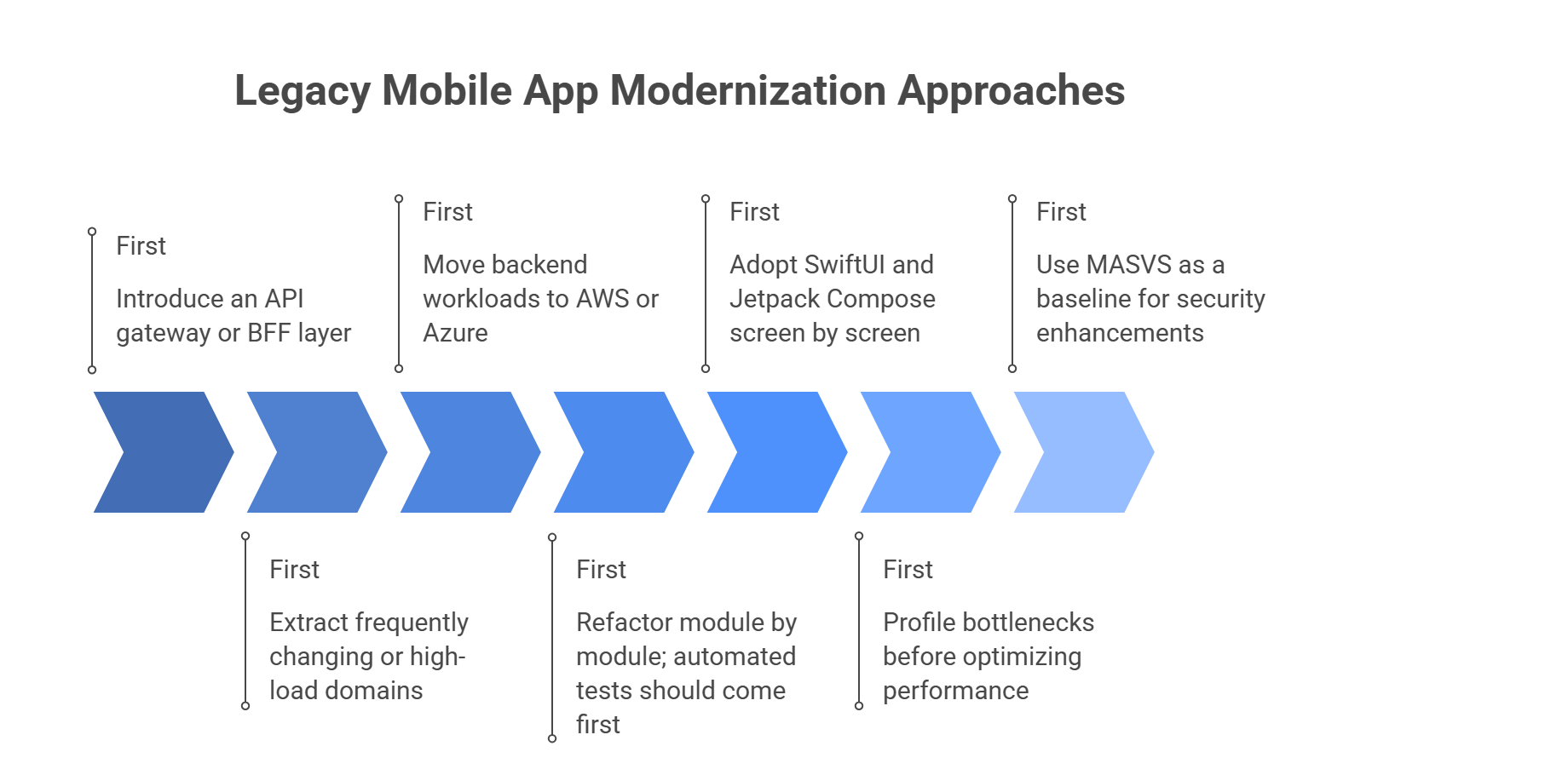
Introducing an API gateway or a backend-for-frontend (BFF) layer between the app and legacy systems is often the highest-leverage first move. The app talks to a stable contract, and teams can replace whatever sits behind that contract without forcing a new app release each time.
Backend Modernization
Rather than decomposing an entire monolith, extract the domains that change most often or carry the most load, such as authentication, payments, or notifications, into independent services first.
Cloud Migration
Moving backend workloads to AWS or Azure brings autoscaling, managed databases, and content delivery networks within reach. Not every workload needs the same treatment, and choosing the right migration path for each workload is what separates a durable migration from an expensive relocation.
Code Refactoring
Refactoring restructures code without changing its behavior. Because Kotlin interoperates with Java and Swift interoperates with Objective-C, teams can migrate module by module while the app keeps shipping. Automated tests should come first, so every refactor can be verified.
UI/UX Improvements
SwiftUI and Jetpack Compose can be adopted screen by screen alongside existing views. That lets teams refresh high-traffic journeys, fix accessibility gaps against WCAG, and align with current platform conventions without a big-bang redesign.
Performance Optimization
Profile before optimizing, using Xcode Instruments and Android Studio profilers to locate real bottlenecks. Common wins include response caching, pagination, image compression, and offline-first data sync for users on unreliable networks.
Security Enhancements
The OWASP Mobile Application Security Verification Standard (MASVS) provides a practical baseline. Priorities typically include removing secrets from the app binary, moving to OAuth 2.0 with PKCE, enforcing secure storage, and adding dependency scanning to the build pipeline.
When Is Incremental Modernization Better Than a Full Rewrite?
Incremental modernization is usually the better choice when the app’s core business logic is sound, users depend on continuity, and the problems are concentrated in specific layers rather than spread across the entire codebase.
| Signal | Favors incremental modernization | Favors a rewrite |
|---|---|---|
| Business logic | Correct, and encodes years of hard-won edge cases | No longer matches how the business operates |
| Where problems sit | Concentrated in specific modules or layers | Pervasive across the codebase |
| Platform support | Framework and language still supported | Framework abandoned with no viable migration path |
| Delivery pressure | Business must keep shipping features | Business can fund a parallel build and a feature freeze |
| Codebase access | Complete source code that builds reliably | Source code incomplete, or the app cannot be compiled |
Consider a field service company whose technicians rely on an eight-year-old Android app. The job-scheduling logic is correct, but sync failures in low-coverage areas cost technicians hours every week. A full rewrite would freeze feature work for months. Rebuilding only the sync layer with an offline-first data store, behind the existing interface, addresses the actual problem in a far shorter window.
A rewrite is still the right answer in some cases, particularly when the original framework is a dead end. When that happens, the framework decision deserves the same rigor, and our analysis of native, React Native, and Flutter for enterprise mobile apps outlines the trade-offs.
A Step-by-Step Approach to Modernizing a Legacy Mobile App
Successful modernization follows a disciplined sequence: assess, protect, stabilize, then transform.
- Define business outcomes. Tie the program to measurable goals such as faster release cycles, fewer crashes, lower hosting costs, or readiness for a new market, so every technical decision has a business test.
- Audit the codebase and architecture. Review code quality, dependency health, security findings, build pipelines, crash analytics, and app store reviews to understand where the real problems sit.
- Map dependencies and prioritize. Score each component by business value and technical risk. High-value, high-risk components usually go first.
- Build a safety net. Put automated regression testing and quality assurance around critical user journeys, along with CI/CD and feature flags, before changing anything significant.
- Stabilize the foundation. Update platform SDKs, upgrade or replace outdated libraries, and remediate known vulnerabilities.
- Modernize in increments. Introduce the API layer, then upgrade priority modules one at a time, releasing each behind feature flags to limit exposure.
- Measure and iterate. Track crash-free sessions, startup time, release frequency, and support ticket volume against the baseline set in step one.
- Institutionalize continuous modernization. Reserve a fixed share of each release cycle for technical debt so the app does not drift back into legacy status.
Business Benefits and Potential Challenges
The central benefit of incremental modernization is risk-adjusted value. Improvements reach users within release cycles rather than years, spending is spread over time and tied to visible results, and the business logic that took years to refine is preserved. A modernized architecture also creates options. A clean API layer and cloud-ready backend are what make it practical to add AI capabilities to an existing product instead of building a new one around them.
The approach has real challenges. Hidden dependencies surface mid-project. Running old and new components side by side adds temporary complexity. Scope can expand as each fix reveals the next problem, and internal teams may lack experience with modern frameworks. Stakeholders can also lose patience with progress that is steady rather than dramatic. Strong governance, a prioritized backlog, and clear metrics reported to leadership keep these risks contained.
How to Choose the Right Modernization Strategy
The right strategy depends on business criticality, regulatory exposure, internal capacity, and total cost of ownership over several years, not just the upfront estimate. Apps operating under HIPAA, PCI DSS, or public sector accessibility requirements need compliance built into every increment, not retrofitted at the end.
When evaluating a partner, look for an assessment-first approach, a transparent and phased roadmap, verifiable security and quality practices, and demonstrated comfort working in codebases they did not write. Starting with a mobility consulting assessment gives leadership an evidence-based view before committing budget. App Maisters, a Houston-based ISO 9001 and ISO 27001 certified technology company, applies this approach across native iOS and Android, cross-platform frameworks, and AWS and Azure cloud environments.
Conclusion: Modernize With Intent, Not by Default
A struggling legacy mobile app is rarely a reason to throw everything away. More often, it is a signal that specific layers have fallen behind the business they serve. Organizations that diagnose those layers precisely, protect what still works, and modernize in measured increments tend to reach a stable, scalable app sooner and with less risk than those that default to a rewrite.
The question for technology leaders is not whether the app is old. It is whether the app can still change at the speed the business needs. If the answer is no, a structured modernization program can restore that capability without halting delivery.
FAQs
What is legacy mobile app modernization?
Legacy mobile app modernization is the process of upgrading an existing app’s code, architecture, backend, and user experience so it meets current business, security, and platform requirements. It preserves the parts of the app that still deliver value instead of replacing the whole system.
Can a legacy mobile app be modernized without a full rewrite?
Yes. Most legacy apps can be modernized incrementally by adding an API layer, refactoring high-risk modules, migrating the backend to the cloud, and refreshing the UI screen by screen. A rewrite is usually justified only when the framework is abandoned, the business logic is fundamentally wrong, or the source code cannot be built.
How long does mobile app modernization take?
Timelines depend on app size, code quality, and scope. An initial assessment typically takes a few weeks, and an incremental approach is designed to deliver the first measurable improvements within one or two release cycles rather than waiting for a full program to finish.
How do I decide whether to modernize or rebuild my app?
Modernize when the business logic is sound and problems are concentrated in specific layers. Rebuild when the platform has no future, problems are pervasive, and the business can afford a parallel build. A code and architecture audit provides the evidence for this decision.
What is the strangler fig pattern in app modernization?
The strangler fig pattern replaces a legacy system gradually. New components are built alongside the old ones, traffic shifts to them over time, and legacy parts are retired once their replacements are proven. It allows modernization without a risky cutover.
Does app modernization require moving to the cloud?
Not always, but cloud migration is often part of it. Moving backend services to platforms such as AWS or Azure improves scalability, resilience, and cost control, while the mobile app itself is modernized through refactoring, UI updates, and security improvements.
How does modernization improve mobile app security?
Modernization removes deprecated libraries, moves secrets out of the app binary, adopts current authentication standards such as OAuth 2.0 with PKCE, and adds automated dependency scanning. Aligning with the OWASP MASVS gives a measurable security baseline.