


A Guide to Creating an Augmented Reality Application
Augmented Reality (AR) has moved well past the experimental phase and is now a core part of profitable digital experiences. Retailers use AR “try-before-you-buy” tools to lift conversions and cut returns, manufacturers streamline workflows with AR-guided tasks, and educators lean on immersive learning. Estimates of the AR market’s size vary by methodology, but most major analysts now put 2026 global AR revenue somewhere between $120 billion and $210 billion, with double-digit compound annual growth expected through the end of the decade.
What’s changed most since last year isn’t the market size it’s the hardware. Smart glasses have gone from prototype to shipping product, AI is now embedded directly into AR pipelines, and Android XR has emerged as a real rival to Apple’s ecosystem. Partnering with an experienced mobile app development company can help businesses turn these shifts into impactful, user-driven solutions rather than one-off experiments.
Why AR Is Booming in 2026
Faster smartphone chipsets, near-universal 5G, and more mature dev tools have carried AR from novelty to daily utility. Most current-generation Android flagships include depth-sensing hardware for realistic object placement and occlusion, while Apple’s ARKit and RealityKit remain a strong, well-integrated pairing for iOS development.
The bigger story this year is wearables. Samsung’s Galaxy XR headset, released in late 2025, has drawn strong reviews and put real pressure on Apple Vision Pro. More significantly, 2026 is the first year smart glasses look like an actual consumer category rather than a string of experiments: Samsung’s Galaxy Glasses, Google’s Android XR glasses (built with partners like Warby Parker and Gentle Monster), and Meta’s next-generation Ray-Ban line are all shipping or launching this year, with Snap’s Specs already available by pre-order. Nearly all of them lean on generative AI Gemini, in Android XR’s case to power contextual, hands-free overlays rather than simple camera filters.
WebAR, powered by the WebXR standard, remains the fastest route to market for brands that want AR without requiring an app download still the right call for marketing campaigns and lightweight product visualization.
On the commercial side, AR-enabled shopping experiences continue to show strong conversion lifts and measurably lower return rates for retailers, and industrial and training applications keep showing reduced error rates and faster task completion. For a deeper look at where the ROI is showing up across industries, see our breakdown of how AR, VR, and mixed reality drive business growth.
AR Application Development Process
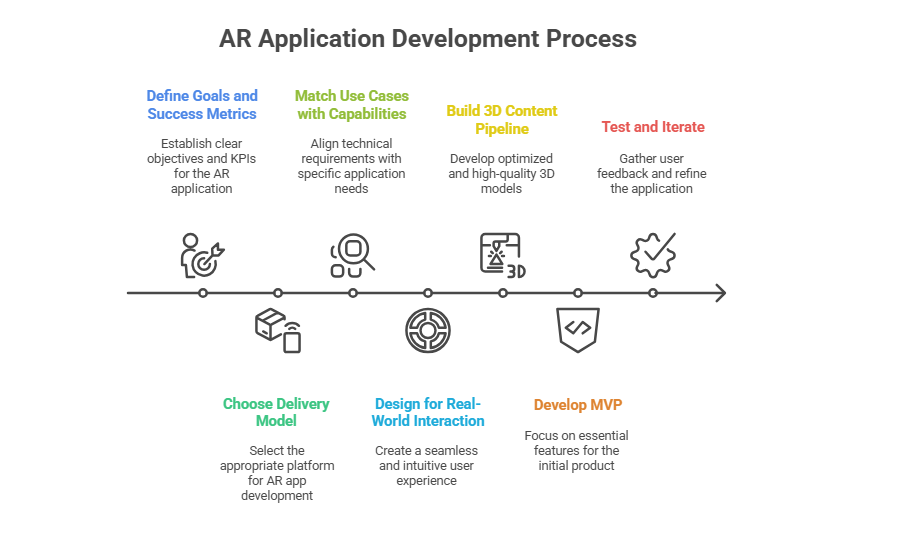
Step 1: Define Goals and Success Metrics
Before writing a line of code, get precise about what the AR app needs to accomplish. Are you trying to lift online sales, improve worker training, or enable remote collaboration? Defining KPIs up front — lower return rates, faster production line assembly, better learning retention keeps the project accountable to real business value instead of novelty.
A furniture retailer, for instance, might aim to cut returns by letting shoppers preview items in their own space, while a factory might target fewer assembly errors through AR-guided workflows.
Step 2: Choose Your Delivery Model
Native Mobile Applications
Built on ARKit (iOS) or ARCore (Android), native apps deliver the best performance and deepest hardware integration the right choice for high-end, feature-rich AR experiences.
Cross-Platform Development
Engines like Unity and Unreal let you build once and ship to both iOS and Android, which is ideal for consistent, high-fidelity 3D experiences without maintaining two codebases.
WebAR
Browser-based AR on the WebXR standard needs no download and is instantly shareable still the best fit for marketing promotions, product demos, and quick-access experiences.
Smart Glasses / Android XR
The newest option. With Android XR now shipping across Samsung, Google, and partner hardware, and developer tools like the Android XR SDK and Jetpack Projected maturing quickly, glasses-first AR is becoming a viable target for hands-free, ambient use cases particularly in field service, logistics, and enterprise training.
Step 3: Match Use Cases with Capabilities
Your use case dictates the technical requirements:
- Product visualization needs accurate plane detection, light estimation, and occlusion.
- AR try-on for clothing or cosmetics needs precise face or body tracking and high-quality 3D assets.
- Industrial training benefits from persistent anchors, detailed 3D models, and step-by-step guided instructions.
- Field service and remote assistance increasingly pair AR overlays with AI models that recognize equipment and surface repair steps automatically.
Mapping capabilities to your specific use case keeps the app functional, engaging, and aligned with real-world needs rather than feature bloat.
Step 4: Designing for Real-World Interaction
A well-designed AR experience feels seamless. Onboarding should clearly guide users through scanning their surroundings and placing objects. Scaling, rotation, and positioning controls need to feel natural, with visual feedback confirming placement. Lighting adaptation and occlusion where virtual objects correctly disappear behind real-world ones do the most to sell the illusion.
Accessibility matters too: large touch targets, simple gestures, and voice guidance where appropriate help your AR app reach a wider audience, including users on smart glasses who may not have a touchscreen at all.
Step 5: Building a Strong 3D Content Pipeline
High-quality, well-optimized 3D models remain the foundation of any AR experience. Cross-platform formats like glTF/GLB and USDZ (for iOS) are standard. Models need reasonable polycounts and efficient textures to stay performant on mobile, and lighting/material properties should be tuned to render convincingly across different real-world environments.
Photogrammetry and 3D scanning can speed up asset creation, and generative AI tools have become genuinely useful for producing draft textures and base meshes but every AI- or scan-generated asset still needs a quality control pass to confirm scale accuracy and visual consistency before shipping.
Step 6: Developing the MVP
Focus your MVP on the essentials:
- Reliable scene detection and object placement
- Simple scale and rotation controls
- Fast loading and smooth performance across target devices
- Basic analytics to track usage and engagement
From there, layer in advanced features like occlusion, multi-user collaboration, and real-time data integration.
Step 7: Testing and Iteration
User testing is important to reveal usability flaws. Watch how fast users can scan their space, set objects down, and perform tasks. In business environments, track KPIs such as conversion rates, average order value, and return rate shifts pre- and post-AR deployment.
For training or industrial use, track improvements in skill retention, error rates, and task completion times.
The Future of Augmented Reality
AR’s near-term future is being shaped as much by software as by headsets. While devices like Galaxy XR and the eventual Apple smart glasses generate headlines, the real growth is happening in mobile AR and, increasingly, lightweight smart glasses the most accessible and scalable form factors. WebXR continues to widen browser support, making cross-platform AR easier to deploy without app installs.
AI is now the connective tissue across all of it: context-aware overlays, real-time object recognition, and personalized content delivery are quickly becoming baseline expectations rather than differentiators. We cover this convergence in more detail in our piece on AI-enhanced AR and VR apps, and you can see how these shifts rank against other emerging technologies in our 2026 mobile app development trends roundup.
Where AR Delivers Real Value
From consumer goods to industrial production, AR brings measurable value. Retail brands see meaningful conversion lifts and fewer returns by letting customers engage with products digitally before buying. In manufacturing, AR-guided workflows reduce training time, improve accuracy, and cut rework costs.
Healthcare continues to benefit as well, with AR supporting surgical navigation, patient education, and remote diagnostics. Because AR’s core strength is visualization, training, and real-time interaction, it applies to nearly any business where those three things.
Where AR Delivers Real Value
From consumer goods to industrial production, AR brings measurable value. Retail brands see meaningful conversion lifts and fewer returns by letting customers engage with products digitally before buying. In manufacturing, AR-guided workflows reduce training time, improve accuracy, and cut rework costs.
Healthcare continues to benefit as well, with AR supporting surgical navigation, patient education, and remote diagnostics. Because AR’s core strength is visualization, training, and real-time interaction, it applies to nearly any business where those three things.
Security, Privacy, and Compliance
AR apps routinely access spatial and camera data, so handling it responsibly matters. Processing as much as possible on-device, minimizing what you store, and being transparent about what’s collected all build user trust. For enterprise deployments, encrypting model delivery and enforcing role-based access control help meet industry compliance standards this becomes more important, not less, as AI models increasingly process that spatial data to power contextual features.
Budgeting and Timelines
Basic WebAR campaigns can typically be built in four to eight weeks, assuming 3D assets are already available. More complex native apps with occlusion, multi-platform support, and custom 3D pipelines usually take three to six months or longer. Smart glasses and Android XR targets can add development time given how young the tooling still is. Plan for updates down the line; AR platforms and hardware are evolving quickly enough that a “build once, never touch again” approach won’t hold up.
Final Thoughts
Building an augmented reality application in 2026 isn’t about chasing the newest headset it’s about delivering tangible value. By matching your objectives to the right delivery model, investing in a solid 3D content pipeline, and designing for real-world interaction (on phones, headsets, or glasses), your AR project can drive real engagement, efficiency, and business results.
If you’re looking for a mobile app development partner to turn your AR concept into reality, App Maisters builds cutting-edge, high-performance augmented reality apps tailored to your goals from strategy through deployment.
FAQs
Should I build a native AR app or start with WebAR?
Start with WebAR if you need to validate demand fast or the use case is short-lived, like a marketing campaign. Move to native once you need deeper hardware access LiDAR, precise occlusion, persistent anchors that WebXR can’t yet match.
Is it worth targeting Android XR or smart glasses in 2026, or is it too early?
It’s early but no longer premature for the right use case. Enterprise scenarios like field service and warehouse picking are seeing real pilots on Android XR hardware; consumer smart-glasses apps are still riskier given the tooling is only a year or two old.
What 3D file format should I standardize on for cross-platform AR?
Use glTF/GLB as your working format and export to USDZ for iOS-specific AR Quick Look experiences. Standardizing early avoids re-exporting your entire asset library later.
How long does a production AR app realistically take in 2026?
Four to eight weeks for a WebAR campaign with assets ready; three to six months for a full native app with occlusion and multi-platform support. Add time if smart glasses or Android XR are in scope, since the tooling is still maturing.
Do I actually need AI in my AR app, or is that just marketing?
It depends on the use case. AI earns its place when it drives real-time object recognition or personalized overlays remote assistance, retail try-on but a straightforward product-visualization app often doesn’t need it to deliver value.
What's the biggest security risk teams overlook in AR apps?
Over-collecting and over-retaining spatial and camera data. Most AR features work fine processing that data on-device and discarding it after the session, which also sidesteps a lot of compliance overhead later.
How do I know if an AR feature is actually working for the business?
Tie it to a metric that existed before AR did return rate, conversion rate, training error rate, task completion time and compare pre- and post-launch. An AR feature with no measurable shift in one of those isn’t pulling its weight.