


Cloud-Integrated SharePoint for Optimized Remote Work
The modern workplace is changing at an unprecedented pace, and the shift to remote and hybrid work models has only accelerated this transformation. Remote work optimization has become more critical than ever, with businesses seeking ways to maintain efficiency, productivity, and collaboration without being confined to a traditional office environment. Cloud-integrated SharePoint is one of the most powerful tools at your disposal in this era of digital transformation. It allows organizations to optimize their remote work setup, enhance team collaboration, and streamline document management and sharing.
In this blog post, we’ll explore how cloud-integrated SharePoint enhances remote work optimization, focusing on its key features, benefits, and real-world applications in today’s hybrid work environment.
What is Cloud-Integrated SharePoint?
Cloud-integrated SharePoint refers to the seamless integration of Microsoft’s SharePoint platform with cloud technologies, enabling businesses to access and manage documents, workflows, and collaboration tools from anywhere with an internet connection. SharePoint is a powerful content management system that helps organizations organize, share, and collaborate on content, and when it is cloud-based, these features become even more accessible and scalable.
SharePoint Development has evolved in recent years, offering not just on-premises solutions but also cloud-based versions like SharePoint Online, which integrates with Microsoft 365 and offers businesses a more flexible, scalable, and secure solution for remote work. By moving to the cloud, SharePoint solutions become more adaptable to various team sizes and organizational needs, making it an essential productivity tool for modern businesses.
The Rise of Remote and Hybrid Work Models
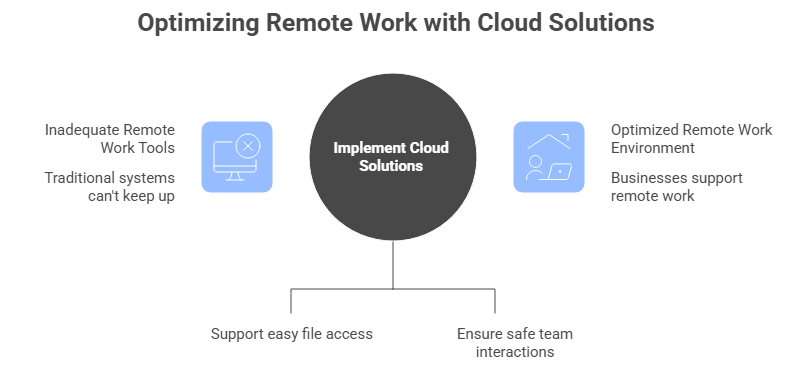
The rise of remote work isn’t just a temporary phase it’s a shift in the way we work that is here to stay. According to a recent study by Gartner, 74% of businesses plan to make remote work a permanent option for employees. Even larger organizations are embracing hybrid work models, where employees split their time between the office and remote work, balancing flexibility with face-to-face interactions.
With this change in how we work, businesses need tools that support seamless collaboration, easy access to files, and secure communication between team members working from different locations. Traditional file-sharing systems and on-premises collaboration platforms simply cannot keep up with the demands of the modern workforce. Cloud solutions, like cloud-based SharePoint, have become a game-changer for organizations looking to optimize remote work environments.
Why Cloud-Integrated SharePoint is Key for Remote Work Optimization
There are several reasons why cloud-integrated SharePoint stands out as a leading choice for optimizing remote work, from enhanced collaboration to document sharing capabilities. Let’s take a closer look at some of the key advantages:
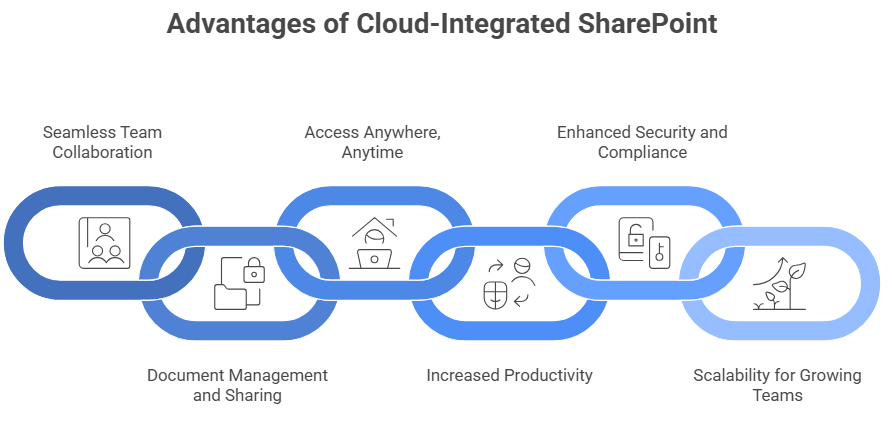
Seamless Team Collaboration
One of the biggest challenges in remote work is ensuring that team members can collaborate effectively despite physical distances. Cloud-integrated SharePoint solves this problem by offering a unified platform where employees can co-author documents in real-time, share files effortlessly, and communicate through integrated chat and video tools. This makes team collaboration more cohesive, even when working across different time zones or locations.
With SharePoint’s collaboration tools, employees can share documents, comment, and update content in real-time, improving productivity and reducing the need for back-and-forth emails or version control issues.
Document Management and Sharing
Remote work often involves sharing and managing a large volume of documents and files. SharePoint simplifies this process by providing a secure platform for document storage, version history tracking, and document approval workflows. Additionally, document sharing is more streamlined, allowing employees to share files with ease, whether inside or outside the organization.
Cloud-integrated SharePoint offers enhanced security features, such as encryption, permissions control, and audit logs, which ensure that sensitive company documents are kept safe, even when accessed remotely.
Access Anywhere, Anytime
One of the most significant advantages of using cloud-based SharePoint is the ability to access your files, documents, and tools from anywhere at any time. With traditional, on-premises SharePoint setups, accessing files remotely often involved complex VPN setups or a reliance on physical office networks. Cloud integration eliminates these barriers, allowing employees to connect to SharePoint from any device with internet access.
Whether employees are working from home, a coffee shop, or while traveling, they can stay productive and access essential documents, communications, and collaboration tools.
Increased Productivity with Integrated Tools
Productivity tools are essential to remote work optimization, and SharePoint integrates seamlessly with Microsoft 365, enabling teams to use tools like Word, Excel, PowerPoint, and Teams within the SharePoint environment. This tight integration ensures that employees don’t need to switch between multiple platforms to get their work done.
For instance, a team can work together on a document in Word, while simultaneously discussing it on Teams and sharing it through SharePoint, all within a single ecosystem. This unified approach eliminates distractions and makes collaboration smoother.
Enhanced Security and Compliance
Security is always a concern when it comes to remote work. Cloud-integrated SharePoint takes this concern seriously by offering advanced security features like multi-factor authentication (MFA), data loss prevention (DLP), and advanced encryption. SharePoint ensures that only authorized users can access specific documents and folders, preventing data breaches and leaks.
Additionally, SharePoint offers compliance features that help organizations meet industry standards, such as GDPR, HIPAA, and SOC 2, ensuring your business adheres to privacy and security regulations.
Scalability for Growing Teams
As organizations grow and evolve, their remote work needs will also change. Cloud-based SharePoint is highly scalable, meaning it can adapt to the growing number of team members, files, and workloads. Whether your team expands by 10 or 100 people, SharePoint’s cloud-based infrastructure ensures that resources are available as needed without compromising performance or security.
Real-World Applications of Cloud-Integrated SharePoint
Several industries are already benefiting from cloud-integrated SharePoint in their remote work environments. From tech startups to global corporations, SharePoint is helping businesses of all sizes streamline communication, enhance team collaboration, and optimize productivity.
For example, law firms can use SharePoint to securely store sensitive legal documents and easily share them with clients and partners, all while maintaining confidentiality and compliance with regulations. Similarly, marketing agencies can collaborate on content creation, sharing resources like design files, reports, and presentations in a centralized location.
The Role of Cloud Consulting in Implementing SharePoint
While SharePoint is a powerful tool, leveraging its full potential requires expertise. This is where cloud consulting services come into play. By partnering with experts who specialize in SharePoint development and cloud migration, businesses can ensure that their SharePoint environment is tailored to their unique needs and seamlessly integrated with other cloud solutions.
Cloud consultants assist in planning, developing, and optimizing SharePoint for your organization, ensuring that it aligns with your overall business goals. Whether you’re migrating from an on-premises system or enhancing your current cloud-based setup, working with a consulting firm ensures a smooth transition and maximum efficiency.
Final Thoughts
As remote and hybrid work environments become increasingly integral to the modern workforce, businesses must adopt tools that not only support but enhance the way teams collaborate and stay productive. Cloud-integrated SharePoint stands out as a powerful solution, offering seamless document management, real-time collaboration, and secure access to critical resources from anywhere in the world. With its robust features and cloud-based infrastructure, SharePoint helps organizations optimize remote work, foster team engagement, and maintain business continuity in an evolving landscape.
For companies looking to implement or elevate their SharePoint capabilities, App Maisters is here to guide you every step of the way. With a proven track record in SharePoint development and cloud consulting, we specialize in tailoring solutions that fit your unique business needs. Let us help you unlock the full potential of SharePoint, enabling your teams to collaborate more efficiently, improve workflows, and thrive in today’s dynamic remote work environment.
FAQs
What is Cloud-Integrated SharePoint and how does it improve remote work?
Cloud-Integrated SharePoint is a cloud-based version of Microsoft SharePoint that allows teams to access documents, collaborate in real-time, and manage content from anywhere, using any device with an internet connection. By leveraging cloud solutions, businesses can streamline document sharing, improve productivity, and enable secure, efficient collaboration. At App Maisters, we specialize in SharePoint development and can help organizations integrate SharePoint into their remote work setups to boost efficiency and collaboration.
How can SharePoint help my team collaborate remotely?
SharePoint enhances team collaboration by allowing multiple team members to work on documents simultaneously, with real-time editing, comments, and notifications. It centralizes important files and communication, making them easily accessible regardless of location. At App Maisters, we customize SharePoint solutions to help teams collaborate seamlessly, ensuring that remote work is as efficient as working in the office.
What are the key benefits of using SharePoint for remote work?
Key benefits of using SharePoint for remote work include improved document management, secure file sharing, real-time collaboration, and the ability to work from anywhere. With cloud-integrated SharePoint, your team can stay productive without the limitations of physical office spaces. App Maisters can assist in setting up and optimizing your SharePoint environment to ensure maximum efficiency for your remote or hybrid teams.
Is SharePoint secure for remote work?
Yes, SharePoint provides strong security features like multi-factor authentication (MFA), data loss prevention (DLP), and encryption to protect sensitive documents and information. SharePoint’s security capabilities ensure that even remote access complies with strict corporate data protection standards. App Maisters specializes in SharePoint security and can configure the platform to meet your business’s unique security needs.
How can I migrate to Cloud-Based SharePoint for my business?
Migrating to Cloud-Based SharePoint requires careful planning and execution to ensure minimal disruption. This typically involves assessing your current SharePoint setup, migrating data, and integrating with other tools like Microsoft 365. App Maisters offers expert cloud consulting services to help you transition smoothly to SharePoint Online, optimizing your remote work environment while ensuring data integrity and security.
Can SharePoint integrate with other productivity tools for remote teams?
Absolutely! SharePoint integrates seamlessly with Microsoft 365 tools such as Teams, Word, Excel, and PowerPoint, enabling teams to collaborate effectively without switching between platforms. Whether it’s sharing documents or communicating via video calls, SharePoint’s integration enhances your team’s ability to work together remotely. At App Maisters, we help integrate these tools into your SharePoint setup for a unified, efficient workflow.
How do I optimize my remote team’s productivity using SharePoint?
To optimize remote team productivity with SharePoint, you need to leverage its features for real-time collaboration, document sharing, and workflow automation. SharePoint also allows teams to stay aligned on tasks, access information easily, and maintain version control. App Maisters offers tailored SharePoint development services to ensure that your SharePoint environment supports your specific remote work needs and boosts overall team productivity.